Responding to Progress Report Requests
The midterm progress report campaign requests instructors to provide feedback about students in their course(s). You are not required to complete the form for each student, but please mark the students of which you have a concern and click Submit (I’m Finished) to mark the other students “no concern.”
How to Respond to Progress Report Requests
Instructors will receive an email request to submit Progress Reports. The email has a link to the Progress Report Feedback form. If an instructor teaches multiple courses and/or sections, these all appear on one page through the email link.
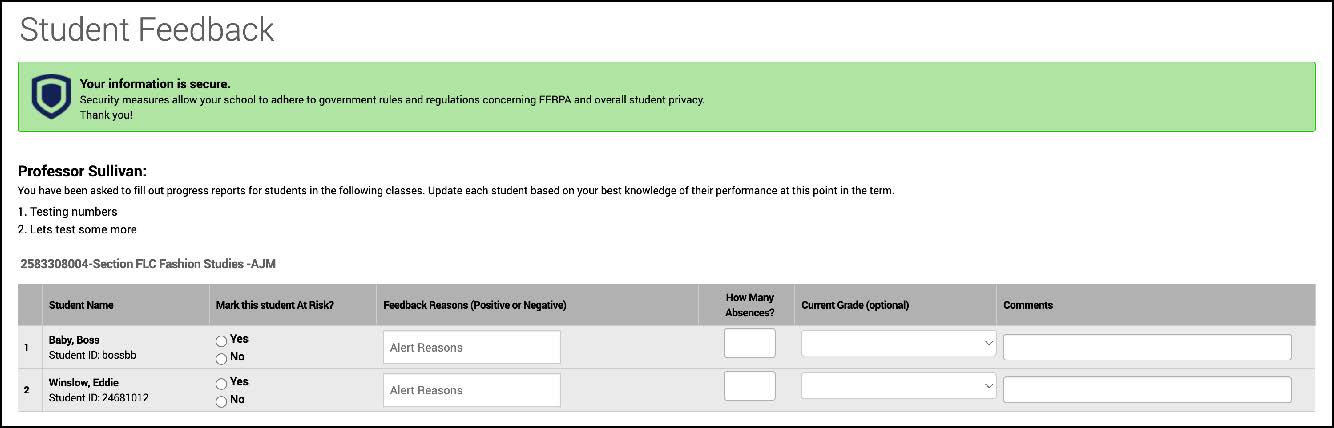
Clicking the link in the email will take you directly to the form to submit your progress reports (shown below). You may use this link multiple times to return to your progress report feedback form until you submit all as completed.
You can also submit progress reports from the platform from the CU Navigate Professor Home page. The link in the yellow box leads to the same feedback form.
You can access CU Navigate here.
Once you click a Progress Reports link, you can fill out the following fields for your students.
At-Risk to Fail Your Class?
Use this field to indicate if this student is currently at risk of failing your class.
Notification Reasons
Select a reason you are issuing the alert. This is required if the student is at-risk.
- Assignment Submission – Negative
- Course Participation – Negative
- Course Performance – Negative
- Great Work! – Positive
- No Reason (blank) - Neutral
Current Midterm Grade
The grade the student has earned in this course.
Comments
Enter comments regarding how this student is progressing in the course and recommendations for next steps
Once you filled out these fields you have two options:
- If you have completed all progress reports, click Submit (I’m Finished). Clicking this button will submit reports for the students you marked and the students you did not mark will default to “no concerns” status. You will not be able to return to this form after clicking this button.
- If you plan to submit some progress reports and return later click I have started the process but have not yet completed it. Clicking this button you will submit completed progress reports, but have the option to return to complete the rest of the reports. You can use the same link you were provided to return to the form.
You must click one of the option above to submit any progress reports.
