Orientation Reserved Seating
When building Fall and Spring course schedules, coordinators must accurately account for the projected enrollment needs of incoming first-year and transfer students. To ensure a seamless orientation registration process, these anticipated numbers must be entered directly into the course section Maximum and Projected fields. Utilizing these specific metrics during the initial scheduling phase prevents registration bottlenecks and guarantees that our newest students have access to the foundational courses they need to succeed.
To accurately determine these numbers, coordinators can leverage two primary data tools. The Orientation Seat Reserve Tracking dashboard outlines the traditional course mix typically taken by incoming students. For specific enrollment demands across any course or level, the Seat Projections Dashboard uses historical data to estimate seat needs. To extract your specific data, simply filter this dashboard by your Department and/or Subject, and toggle New Students Projected? to Yes. This will display the exact number of seats you need to reserve for the upcoming orientation cycles.
Orientation Seating Cycle
Reserving Seats
Seats are reserved for fall and spring orientation sessions to support the number one student experience, in alignment with Clemson Elevate, for our newly admitted cohort.
Releasing Seats
The incremental releasing of reserved seats ensures students have equitable seating options throughout orientation registration sessions. Releases are based on attendance.
Help and Support
The Office of Records and Registration offers departmental Registration Coordinators essential resources for all components of orientation seat reserves and release.
Orientation Seat Reserve Procedures
Reserving for Fall Terms
Mid-February — Include reserved seats in Maximum Capacity for Room Scheduling
- Find the predicted seats needed in the Seat Projections Dashboard
- The Maximum and Projected fields in SSASECT should match for your section to be assigned an appropriately sized classroom
- These fields should reflect the total number of students allowed to enroll
- Includes both continuing students and new admits for fall
March 27 — Remove first-year and transfer student seats from Maximum Capacity
After room scheduling is complete (est. March 16), deduct the number of seats to be reserved from the Maximum Capacity in SSASECT or the iROAR Seat Release Tool before the Early Registration period begins in April.
-
- Find the recommended reserves for new students in the Seat Projections Dashboard
- Toggle New Students Projected? to Yes
- Deduct that number from capacity to reserve for orientation
- Keep a record of sections with orientation reserves
- Find the recommended reserves for new students in the Seat Projections Dashboard
Do not adjust the Projected field — leave it set to the total number of students projected, or allowed, to enroll.
Reserving Seats for FallReserving for Spring Terms
September — Include reserved seats in Maximum Capacity for Room Scheduling
SSASECT is the only method used to reserve seats for the Spring term.
- Find the predicted seats needed in the Seat Projections dashboard
- The Maximum and Projected fields in SSASECT should match for your section to be assigned an appropriately sized classroom
- These fields should reflect the total number of students allowed to enroll
- Includes both continuing students and new admits for spring
October 29 — Remove first-year and transfer student seats from Maximum Capacity
After room scheduling is complete (est. October 26), deduct the number of seats to be reserved from the Maximum Capacity in SSASECT before the Early Registration period begins in November.
- Find the recommended reserves for new students in the Seat Projections dashboard
- Toggle New Students Projected? to Yes
- Deduct that number from capacity to reserve for orientation
- Keep a record of sections with orientation reserves
Do not adjust the Projected field — leave it set to the total number of students projected, or allowed, to enroll.
Orientation Seat Release Procedures
Releasing for Fall Terms
Seats are released in SSASECT or the iROAR Seat Release Tool before each orientation registration session or time ticket. Registration Coordinators work with Academic Advisors at each session via Microsoft Teams® to assist with questions and/or enrollment issues.
- June 15-19
- July 13-17
- August 13-14
Refer to the Registration Schedule for detailed start times.
How Many Seats to Release
To determine how many seats to open for each session or time ticket, follow these steps based on your reservation type:
- For standard1 seat projections: Use the exact numbers listed in the Seats to Release row on the Seat Release for Orientation Registration dashboard.
- For custom2 seat reserve: Calculate your number manually if you set reserves outside the dashboard's suggestions.
Calculation for Custom Reserves
Use the Percentage of Seats to Release per Session found on the Seat Release dashboard, and apply this formula:
{release percentage} x {total initial reserved seats} = {seats to release}
Example:
-
- Release Percentage: 3.7% (0.037)
- Total Initial Reserved Seats: 76
- Calculation: 0.037 × 76 = 2.81
- Action: Release 3 seats (round the final number to the nearest whole seat using standard rounding rules).
1. Reserves from Seat Projections dashboard.↩
2. Reserves established outside of the Seat Projections dashboard recommendations.↩
Releasing for Spring Terms
Seats are released in SSASECT or the iROAR Seat Release Tool prior to the orientation registration session in January — typically the Monday before the first day of classes. Registration Coordinators work with Academic Advisors at the January session via Microsoft Teams® to assist with questions and/or enrollment issues.
Orientation Registration in Teams®
As a Registration Coordinator, you will use Microsoft 365 Teams to communicate with students' academic advisors during orientation virtual registration, troubleshoot registration issues, and assist them with enrolling students in classes.
More About Teams®
-
General Information
Our Team in Microsoft 365 Teams is called Orientation Registration and you can request an invitation from an administrator. Channels within our Team are course-specific, monitored by the registration coordinator responsible for that course or courses. Coordinators and registration staff are available on Teams® during registration times on the dates specified in the Orientation Registration Schedule.
You can use the "Time Ticket Help" channel if you need assistance troubleshooting Time Ticket issues — and the "iROAR Technical Issues Help" channel to resolve registration-related issues. If additional technical support is necessary, CCIT Help is available in Teams during each registration session.
-
Launching the Microsoft Teams App
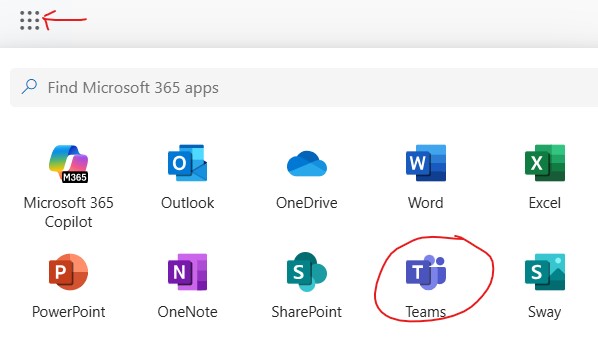
Navigate to 365.clemson.edu:
- Click the App Launcher in the top left corner
- Select the Teams® icon to launch the application
Helpful Resources
- Visit Get Ready for Orientation to find helpful orientation details:
- time ticket closures for continuing students
- orientation dates
- allowable credit hours for new admits
- Refer to the Schedule Building Timeline for dates, deadlines and contact information:
- orientation reserved seat deadlines
- departmental course scheduling
- mass room scheduling
- registration PIN assignments
- Course Seat Request Tool
- Check the Registration Coordinator Orientation Resources🔒Restricted Folder Box folder:
- Orientation Registration team (Microsoft Teams®) information and updates
- Teams® channels contact information
- registration schedule — days and start times
- resolving technical issues in iROAR
- release by section worksheet
- additional documents added as available or requested
- request box folder access
