
Skip to content
a pile of Microsoft Outlook logo tiles stacked on a blue background
Digital Accessibility

Outlook

Images in Outlook

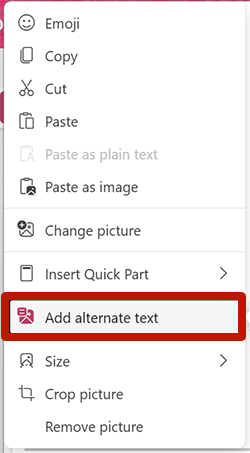
To add alternative text to an image:

  1. Right-click the image.
  2. Select Add alternate text, Edit Alt Text or View Alt Text.
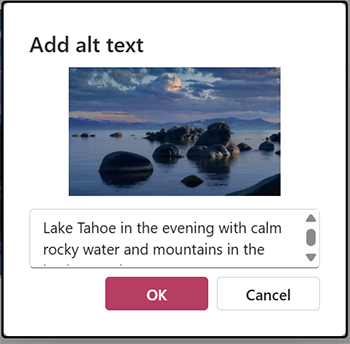
  3. The alt text window will open, where you can edit the image's alternative text.
  4. Select OK.

Screenshot highlighting the add alternate text tool from the right-click dialog in Outlook.

Screenshot of the alternate textdialog in Outlook.

For images used in an email signature, the same technique can be used in the Signature Editor.


Explore Further

Digital Accessibility

Digital Accessibility | Barre Hall