

Reading Order in Word
By design, Microsoft Word is a linear authoring tool. Content generally flows in a logical reading order, with some considerations.
Images
Place images and text boxes inline or manage the reading order of floating content using anchors.
Tabs and Columns
When authoring content that needs to be organized in columns, use either tabs or column formatting. Avoid using tables for layout.
The reading order for tabs and columns follows the document structure, not the visual presentation. Note the difference when choosing how to organize content.
Tabs
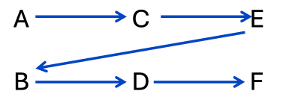
Tabs read from left to right first, then the next line. Consider the following content authored with tabs:
A C E
B D F
The reading order is A, C, E, B, D, F:
Word supports custom positions for tab stops.
Columns
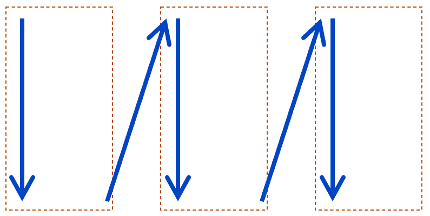
Columns read top to bottom first, then left to right. Consider the following content authored with columns:
A
B
C
D
E
F
The reading order is A, B, C, D, E, F:
Word supports custom formatting for multiple columns.
Show hidden formatting
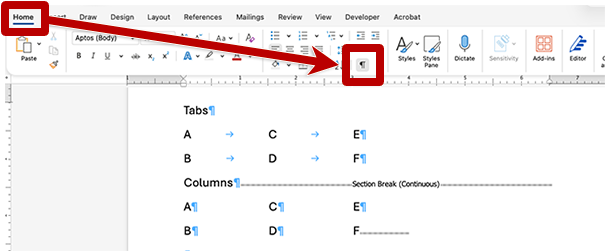
From the Home ribbon, toggle the Show/Hide ¶ ("Pilcrow") button to reveal invisible formatting. The symbols between words indicate keystrokes and formatting that are visually hidden.
Adding space
Empty spaces between words or line breaks can disrupt reading. Toggle the Pilcrow to reveal formatting and eliminate excessive paragraph breaks.
- Set tab stops instead of consecutive spaces to space words horizontally.
- Modify line spacing or paragraph spacing instead of using the Enter key to create paragraph breaks, creating vertical space.
Verify
Use Word’s automated checker and Read Aloud tool, PDF tag order or a screen reader to verify accurate reading order.
