

Tables in Word
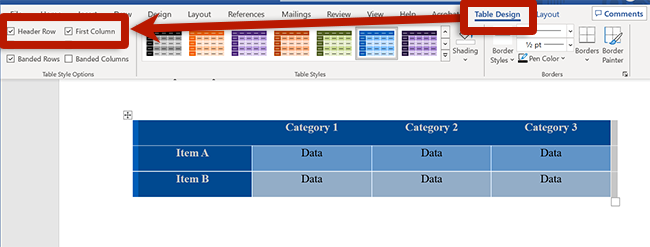
To create a table, select the Insert tab, choose Table and select the number of rows and columns you would like. Selecting the table in the document will reveal the Table Design tab, where you can manage table headers and styles:
- To specify the first row as headers, select Header Row in the Table Design ribbon.
- To specify the first column as headers, select First Column in the Table Design ribbon.
- Modify colors using the Table Styles gallery to ensure strong color contrast.
Remember, tables are meant for data. To manage the layout of the document, use columns and other features available in the Layout ribbon.
